Floor Stand Displays are freestanding retail units designed to present products at eye level, without relying on shelves or walls. They commonly appear near entrances, checkout lanes, promotional aisles, and product categories that need extra attention. Their purpose is practical: attract the shopper, organize merchandise, and encourage a measurable action.
Retail-environment expert Paco Underhill is often quoted saying, “Retail is detail.” That idea explains how these displays work. Their height catches attention from a distance. Their shelves keep products visible and reachable. Printed graphics communicate a message within seconds. A grocery display may hold snack bags, while a pharmacy unit may present boxed healthcare products with clear spacing and strong labeling. Materials, weight distribution, and base stability also matter. A beautiful unit becomes useless if it tips, blocks traffic, or makes restocking difficult.
Floor Stand Displays do not sell products automatically. Placement, lighting, inventory levels, and customer habits influence performance. That assumption is too simple. A display beside a relevant product category may work better than one placed in a crowded aisle. Retail teams should test different locations, record sales changes, and observe customer movement. Some results may be disappointing. That is useful evidence, not failure.
This article examines the main types of Floor Stand Displays, their working principles, construction choices, and retail applications. It also considers overlooked details, including durability, accessibility, maintenance, and visual clutter. A reliable display balances appearance with everyday store conditions. Small design decisions often make the difference.
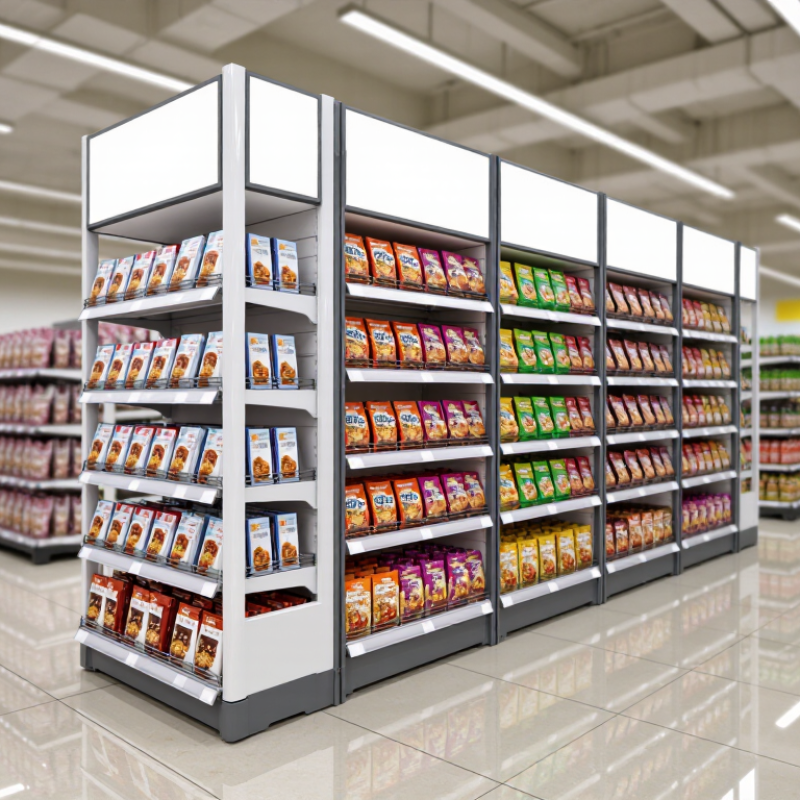
Define Floor Stand Displays Through Their 4 Core Components and Functions
What Are Floor Stand Displays and How Do They Work?
Floor stand displays are freestanding retail units designed to present products at eye level or within easy reach. Their four core components are the base, frame, product holders, and communication panel. Each part performs a practical function. The base provides stability and prevents tipping during customer contact. The frame carries the structure and controls its height. Shelves, hooks, or bins hold products and support organized replenishment. The header panel communicates the product category, offer, or usage benefit.
A strong display guides movement without blocking the shopping aisle. It should face the customer’s natural viewing direction. POPAI’s 2014 Mass Merchant Shopper Engagement Study reported that 82% of purchase decisions occur inside stores. That figure explains why physical visibility still matters. The U.S. Census Bureau’s 2024 Quarterly Retail E-Commerce Sales report placed e-commerce at 16.1% of total retail sales, leaving stores important for discovery and impulse consideration.
In practice, materials must match product weight and handling frequency. A wire hook may suit lightweight packages, while a reinforced shelf handles heavier containers. Clear pricing reduces hesitation. Good spacing also makes replenishment faster. Yet attractive design alone does not guarantee performance. A crowded header can distract shoppers, and an unstable base can damage trust. Field audits should measure stock availability, shopper flow, and sales changes before judging success. Some displays look polished but remain commercially weak.
Classify Display Types by 24–72-Inch Height, Media, and Retail Use
What Are Floor Stand Displays and How Do They Work?
Classify Display Types by 24–72-Inch Height, Media, and Retail Use
Floor stand displays are freestanding structures that present products, messages, or screens at eye level. They usually combine a weighted base, vertical support, display panel, and optional header. In my retail setup experience, height strongly affects visibility. A 24-inch stand suits counter-adjacent promotions or children’s products. A 36–48-inch unit works well beside shelves and product tables. Displays from 60–72 inches create stronger sightlines across busy aisles. However, taller is not always better. A crowded store can make a large display feel intrusive.
Media determines how the stand communicates. Printed displays use posters, pockets, shelves, or sample hooks. They are simple, quiet, and easy to update. Digital displays use screens, media players, and concealed cables for changing content. Hybrid units combine a screen with printed product information or physical samples. Retail use also matters. Narrow 24–36-inch stands fit checkout zones, while 48–60-inch models support product education near aisles. A 72-inch display can mark a department entrance, but its base must remain stable and accessible. That detail is often overlooked.
Tips
Measure customer walking paths before selecting a stand. Keep important text near natural eye level. Test viewing angles from three distances. Check glare, cable safety, and base stability. I would also review the design after one busy day. Real traffic may reveal problems that a showroom test misses.
Floor Stand Display Types by Height, Media, and Retail Use
Floor stand displays are freestanding units typically used to present printed graphics, merchandise, digital content, or interactive information. The chart shows representative height ranges within the common 24–72-inch category; actual specifications vary by display design and retail environment.
Explain the Operating Workflow from Content Input to 1080p or 4K Output
What Are Floor Stand Displays and How Do They Work?
A floor stand display is a freestanding digital screen designed for shops, exhibitions, reception areas, and public venues. Its enclosure holds the panel, media player, power system, and mounting frame. The screen stays upright. That detail matters for viewing height, stability, and cable protection.
The workflow begins when an operator prepares images, videos, or web-based content. Files may enter through a network connection, USB drive, or content management system. A media player receives the files and checks their format, resolution, frame rate, and audio settings.
It then decodes the content and sends digital image data to the display controller. The controller maps each frame onto the panel, adjusting scaling when the source and screen sizes differ.
A 1920×1080 source produces Full HD output, while a compatible 3840×2160 panel can show 4K detail. Not every 4K file creates true 4K output.
Timing is important.
The player, cable, controller, and panel must support the selected resolution and refresh rate. If one part is limited, the system may reduce quality or show a blank signal. I have seen loose connections create symptoms that looked like software faults. Power cycling helped, but it was not a real solution.
Technicians should inspect cables, confirm input settings, test brightness, and verify content in both portrait and landscape layouts.
Reflections, heat, and viewing distance also affect the final experience. Some installations need better placement, not sharper video.
Evaluate Performance Using Viewing Distance, Dwell Time, and 1–3-Second Impact
What Are Floor Stand Displays and How Do They Work?
Evaluate Performance Using Viewing Distance, Dwell Time, and 1–3-Second Impact
A floor stand display is a freestanding retail fixture placed near aisles, entrances, or checkout zones. It holds products, graphics, or a small digital screen at eye level. Its performance depends on how quickly shoppers notice it and whether they pause. Distance changes everything. At two to three metres, bold shapes and strong contrast attract attention first. Within one metre, readable pricing and product details become more important.
At two to three metres
Bold shapes and strong contrast attract attention first.
POPAI’s shopper-engagement research reported that roughly three quarters of purchase decisions occur inside stores. This supports using floor displays where shoppers are already comparing products. However, visibility does not guarantee action. A practical audit should record viewing distance, foot traffic, dwell time, and interaction rate. A three-second target is useful. It is not universal. Busy shoppers may offer only one second.
Arbitron’s Retail Media Study found that many shoppers noticed digital screens in retail environments, while fewer remembered the advertised message. That gap matters. The first one to three seconds should show one product, one benefit, and one visual cue. Long copy usually fails at walking speed.
Measure how many people glance, stop, touch, or continue walking. Then adjust height, lighting, and message placement. Field testing often reveals uncomfortable truths. A beautiful display may still sit outside the shopper’s natural sightline.
Select Models by Footprint, Load Capacity, Power Draw, and Screen Size
Floor stand displays are freestanding digital units designed for shops, events, reception areas, and public spaces. They usually combine a stable base, vertical enclosure, screen, media player, and cable management. Content is stored locally or delivered through a network connection. When powered on, the screen plays scheduled images, videos, or interactive messages.
Footprint should match the available floor area, not just the display width. A narrow base suits busy walkways, while a wider base offers better stability in crowded locations. Load capacity matters when adding shelves, touch hardware, protective panels, or external accessories. Check the frame rating and weight distribution carefully. A heavy screen on a light base can become unsafe.
Power draw depends on screen brightness, operating hours, speakers, and attached devices. A larger screen usually consumes more energy, although modern panels vary greatly. Measure the outlet location before installation. Screen size should follow viewing distance: small displays work near counters, while larger panels remain readable across open rooms. In field setups, poor cable routing often creates trip hazards and weakens the installation’s appearance. It is an easy detail to underestimate. Also, product sheets may list ideal power figures, not real daily consumption. Allow extra capacity for startup demand, ventilation, and future accessories.
FAQS
They include the base, frame, product holders, and communication panel. Each part has a practical role.
The base provides stability and reduces tipping during customer contact. An unstable base quickly damages shopper trust.
Hooks suit lightweight packages, while reinforced shelves support heavier containers. Bins work well for loose, small items.
A 24-inch stand suits nearby promotions or children’s products. A 60–72-inch stand creates stronger sightlines across busy aisles.
No. A tall unit may block movement in a crowded store. Measure walking paths before choosing height.
Printed units use posters, pockets, or hooks. Digital units use screens. Hybrid designs combine screens with samples or printed details.
An operator sends files through a network, USB drive, or content system. A media player decodes them and sends image data to the panel.
No. The player, cable, controller, and panel must all support the selected resolution. One weak connection can reduce quality.
They should inspect cables, input settings, power, brightness, and screen orientation. A loose cable may look like a software problem.
Track stock availability, shopper movement, and sales changes. A polished design can still perform poorly. Review it after one busy day.
Conclusion
Floor Stand Displays are freestanding digital or printed units designed to present information, advertising, and product messages at eye level in retail, event, hospitality, and public environments. Their four core components typically include a stable base, vertical support structure, display surface or screen, and power or content connection system. Models can be classified by height, commonly ranging from 24 to 72 inches, as well as by media format, such as static graphics, LCD screens, interactive panels, or product shelving. Their applications vary from promotional messaging and wayfinding to product education and in-store engagement.
Digital Floor Stand Displays operate by receiving content through a media player, network, USB source, or other input, then processing and presenting it in 1080p or 4K resolution. Performance depends on viewing distance, audience dwell time, and the ability to create visual impact within one to three seconds. When selecting a model, consider its footprint, load capacity, power consumption, screen size, placement conditions, and expected audience flow to ensure effective communication and reliable daily operation.

 DuraRacks